
 Steady Spiral


Unreal Engine PIE에서 클라이언트와 서버 값을 한 줄로 비교하기

멀티플레이 디버깅을 하다 보면 클라이언트가 가진 값과 서버가 가진 값을 같은 시점에 비교해야 할 때가 있다. 서버와 클라이언트에서 각각 로그를 남기면 출력이 섞이고 두 줄이 같은 시점의 값이라는 보장도 없다.
PIE에서 Run Under One Process가 켜져 있으면 서버 월드와 클라이언트 월드가 한 프로세스 안에 같이 있다. 그래서 에디터 빌드에서는 클라이언트 코드가 서버 월드에 있는 같은 플레이어의 객체를 직접 읽을 수 있고 두 값을 한 줄에 같이 찍을 수 있다. Lyra 샘플의 LyraDevelopmentStatics에도 PIE의 권한 월드를 찾는 같은 방식의 함수가 있다.
이 글은 Third Person C++ 템플릿에서 이 방식을 직접 구현하고 네트워크 에뮬레이션으로 차이를 만들어 숫자로 확인한 기록이다.
환경
- 검증 버전: Unreal Engine 5.8, Third Person C++ 템플릿
- PIE
Net Mode: Play As Client(같은 프로세스 안의 Dedicated Server),Number of Players2 Run Under One Process켜짐,Launch Separate Server꺼짐
서버 월드 찾기
PIE 월드는 GEngine->GetWorldContexts()에 EWorldType::PIE로 들어 있다. 한 PIE 세션 안에서 NM_Client가 아닌 월드는 Dedicated Server, Listen Server, Standalone 중 하나뿐이므로 그 월드를 찾으면 된다.
UWorld* PIEDebug::FindAuthorityWorld(){#if WITH_EDITOR if (GEngine == nullptr) { return nullptr; }
// A PIE session owns at most one world that is not a client: the dedicated or listen server, or a standalone world for (const FWorldContext& Context : GEngine->GetWorldContexts()) { UWorld* World = Context.World(); if (Context.WorldType == EWorldType::PIE && World != nullptr && World->GetNetMode() != NM_Client) { return World; } }#endif return nullptr;}FWorldContext::RunAsDedicated로 Dedicated Server를 먼저 고르는 방법도 있지만 여기서는 “클라이언트가 아닌 PIE 월드”라는 조건 하나로 줄였다. 서버 월드가 다른 프로세스에 있으면 찾을 월드가 없으므로 nullptr이 반환된다.
같은 플레이어의 서버 측 PlayerController 찾기
서버 월드를 찾았으면 그 안에서 클라이언트 PlayerController와 같은 플레이어를 찾아야 한다. 객체 이름으로는 비교할 수 없다. 아래는 PIE 월드와 PlayerController를 덤프하는 콘솔 명령(tp.Debug.DumpPIEPlayers)의 출력이다.
LogPIEDebug: Authority world: Dedicated ServerLogPIEDebug: [Dedicated Server] PIEInstance=0 RunAsDedicated=1LogPIEDebug: BP_ThirdPersonPlayerController_C_0 (PlayerId=256, UniqueId=NULL:DESKTOP-MH1K636-C7AC..., Pawn=BP_ThirdPersonCharacter_C_0)LogPIEDebug: BP_ThirdPersonPlayerController_C_1 (PlayerId=257, UniqueId=NULL:DESKTOP-MH1K636-CFD2..., Pawn=BP_ThirdPersonCharacter_C_1)LogPIEDebug: [Client 1] PIEInstance=1 RunAsDedicated=0LogPIEDebug: BP_ThirdPersonPlayerController_C_0 (PlayerId=256, ...)LogPIEDebug: match by PlayerId -> BP_ThirdPersonPlayerController_C_0 (PlayerId=256, ...)LogPIEDebug: match by UniqueId -> BP_ThirdPersonPlayerController_C_0 (PlayerId=256, ...)LogPIEDebug: [Client 2] PIEInstance=2 RunAsDedicated=0LogPIEDebug: BP_ThirdPersonPlayerController_C_0 (PlayerId=257, ...)LogPIEDebug: match by PlayerId -> BP_ThirdPersonPlayerController_C_1 (PlayerId=257, ...)LogPIEDebug: match by UniqueId -> BP_ThirdPersonPlayerController_C_1 (PlayerId=257, ...)Client 2의 PlayerController 이름은 _C_0이지만 서버에서 대응하는 객체는 _C_1이다. 각 클라이언트 월드에는 자기 PlayerController 하나만 있기 때문이다.
대신 PlayerState의 값으로 비교한다. PlayerId는 서버가 할당해 클라이언트로 복제하므로 같은 플레이어의 두 사본은 값이 같다.
APlayerController* PIEDebug::FindAuthorityPlayerController(const APlayerController* ClientController){#if WITH_EDITOR UWorld* ServerWorld = FindAuthorityWorld(); const APlayerState* ClientPlayerState = ClientController ? ClientController->PlayerState.Get() : nullptr; if (ServerWorld == nullptr || ClientPlayerState == nullptr) { return nullptr; }
for (FConstPlayerControllerIterator It = ServerWorld->GetPlayerControllerIterator(); It; ++It) { APlayerController* ServerController = It->Get(); const APlayerState* ServerPlayerState = ServerController ? ServerController->PlayerState.Get() : nullptr;
// PlayerId is assigned by the server and replicated to clients, so both copies of the same player share it if (ServerPlayerState && ServerPlayerState->GetPlayerId() == ClientPlayerState->GetPlayerId()) { return ServerController; } }#endif return nullptr;}PlayerState->GetUniqueId()로 비교할 수도 있다. 위 덤프처럼 이 환경에서는 Null OSS가 NULL: ID를 채워 주기 때문에 두 방식의 결과가 같았다.
다만 FUniqueNetIdWrapper의 operator==는 두 ID가 모두 invalid이면 true를 반환한다(CoreOnline.h). 서버와 클라이언트 양쪽 UniqueId가 비어 있다면 모든 클라이언트가 서버 월드의 첫 번째 PlayerController로 매칭된다. PlayerId 비교에는 이 문제가 없어서 이쪽을 기본으로 두었다.
클라이언트에 PlayerState가 아직 복제되지 않은 시점도 있어서 null 검사를 앞에 둔다. Pawn은 서버 PlayerController에서 꺼낸다.
template <typename T>T* PIEDebug::FindAuthorityPawn(const APawn* ClientPawn){ const APlayerController* ClientController = ClientPawn ? Cast<APlayerController>(ClientPawn->GetController()) : nullptr; const APlayerController* ServerController = FindAuthorityPlayerController(ClientController); return ServerController ? Cast<T>(ServerController->GetPawn()) : nullptr;}어느 월드의 로그인지 붙이기
PIE 로그는 서버와 클라이언트의 출력이 한 Output Log에 섞인다. GetDebugStringForWorld()는 월드의 NetMode와 PIE 인스턴스 번호로 Dedicated Server, Listen Server, Client 1 같은 문자열을 만들어 준다. 선언은 UnrealEngine.h에 있고 WITH_EDITOR와 상관없이 정의되어 있다.
#define PIE_LOG(WorldContextObject, Verbosity, Format, ...) \ UE_LOG(LogPIEDebug, Verbosity, TEXT("[%s] ") Format, *GetDebugStringForWorld((WorldContextObject)->GetWorld()), ##__VA_ARGS__)클라이언트와 서버 값 비교
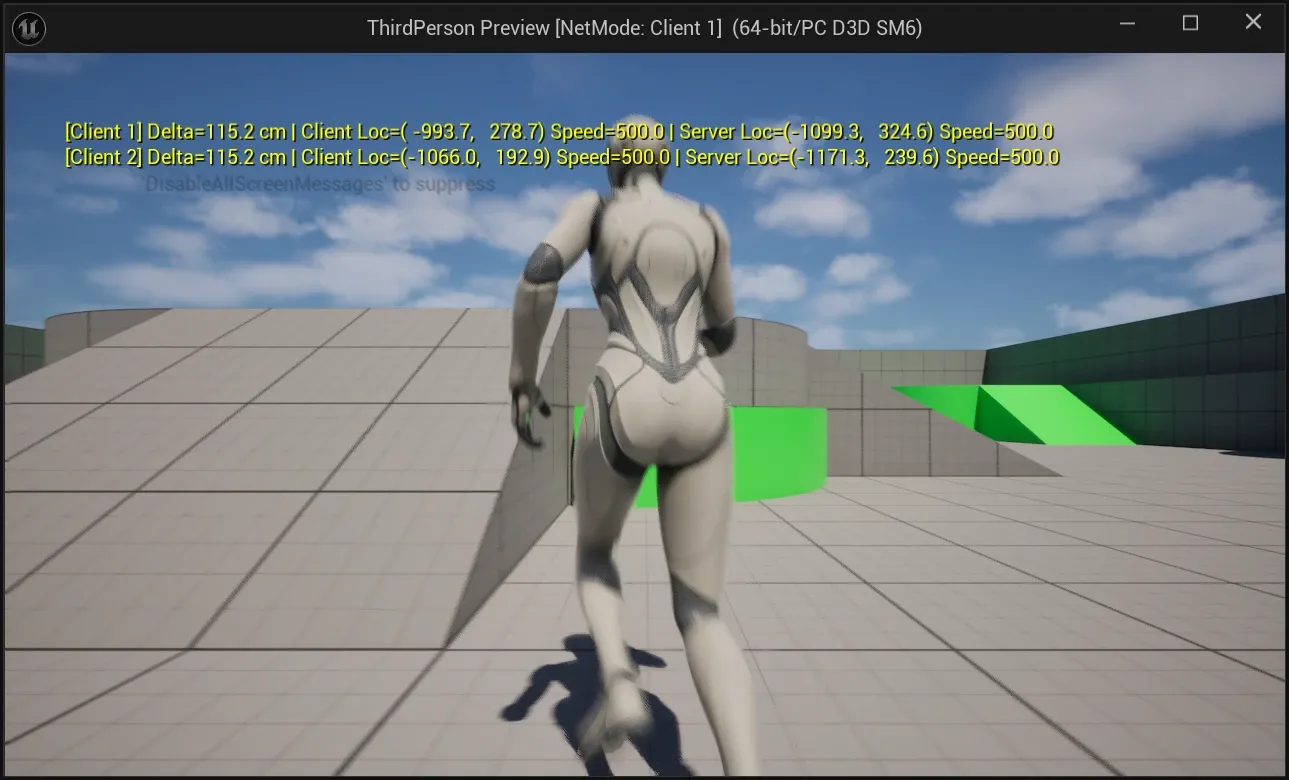
로컬 클라이언트 캐릭터의 위치·속도와 서버 측 사본의 값을 한 줄로 만든다. 화면 메시지는 매 프레임 갱신하고 로그는 0.5초 간격으로 남긴다.
void PIEDebug::CompareWithAuthority(const ACharacter* ClientCharacter){#if WITH_EDITOR using namespace PIEDebug::Private;
if (!CVarCompareWithAuthority.GetValueOnGameThread() || ClientCharacter == nullptr || !ClientCharacter->IsLocallyControlled() || ClientCharacter->GetNetMode() != NM_Client) { return; }
const ACharacter* ServerCharacter = FindAuthorityPawn<ACharacter>(ClientCharacter); if (ServerCharacter == nullptr) { return; }
const UWorld* ClientWorld = ClientCharacter->GetWorld(); const int32 PIEInstance = GetPIEInstance(ClientWorld); const FVector ClientLocation = ClientCharacter->GetActorLocation(); const FVector ServerLocation = ServerCharacter->GetActorLocation(); const FString Comparison = FString::Printf(TEXT("Delta=%5.1f cm | Client Loc=(%7.1f, %7.1f) Speed=%5.1f | Server Loc=(%7.1f, %7.1f) Speed=%5.1f"), FVector::Dist(ClientLocation, ServerLocation), ClientLocation.X, ClientLocation.Y, ClientCharacter->GetVelocity().Size2D(), ServerLocation.X, ServerLocation.Y, ServerCharacter->GetVelocity().Size2D());
// One keyed line per client, refreshed every frame. On-screen messages are shared by every PIE viewport GEngine->AddOnScreenDebugMessage(static_cast<uint64>(7000 + PIEInstance), 1.f, FColor::Yellow, FString::Printf(TEXT("[%s] %s"), *GetDebugStringForWorld(ClientWorld), *Comparison));
// Log at most once per interval for each client static TMap<int32, double> LastLogTimes; double& LastLogTime = LastLogTimes.FindOrAdd(PIEInstance, 0.0); const double Now = ClientWorld->GetRealTimeSeconds(); if (Now < LastLogTime || Now - LastLogTime >= CVarCompareLogInterval.GetValueOnGameThread()) { LastLogTime = Now; PIE_LOG(ClientCharacter, Log, TEXT("%s"), *Comparison); }#endif}AddOnScreenDebugMessage의 메시지는 모든 PIE 뷰포트가 공유한다. 그래서 키를 PIE 인스턴스마다 다르게 주면 한 창에서 Client 1과 Client 2의 줄을 함께 볼 수 있다.
호출은 캐릭터 Tick에서 한다.
void AThirdPersonCharacter::Tick(float DeltaSeconds){ Super::Tick(DeltaSeconds);
// editor-only: compare the predicted client movement against the server-side copy of this character PIEDebug::ApplyAutoMove(this); PIEDebug::CompareWithAuthority(this);}ApplyAutoMove는 측정용 헬퍼다. tp.Debug.AutoMove 60을 주면 로컬 캐릭터가 초당 60도씩 방향을 바꾸며 최고 속도(500cm/s)로 원을 그린다. 손으로 조작하지 않아도 같은 조건에서 반복해 측정할 수 있다.
차이를 만들어 확인하기
PIE의 Network Emulation 설정으로 지연을 주고 등속 구간(양쪽 Speed=500.0)의 Delta만 모았다. 조건마다 약 10초, 샘플은 26~29개다.
| 조건 | 평균 Delta | 범위 |
|---|---|---|
| 에뮬레이션 없음 | 9.5 cm | 5.8 ~ 15.1 cm |
| Clients Only, Outgoing 100ms | 63.2 cm | 56.9 ~ 73.2 cm |
| Clients Only, Outgoing 200ms | 116.2 cm | 106.5 ~ 144.9 cm |
| Server Only, Outgoing 100ms | 11.1 cm | 5.6 ~ 34.4 cm |
200ms와 Server Only 조건의 최댓값은 이동을 시작한 직후의 샘플이다.
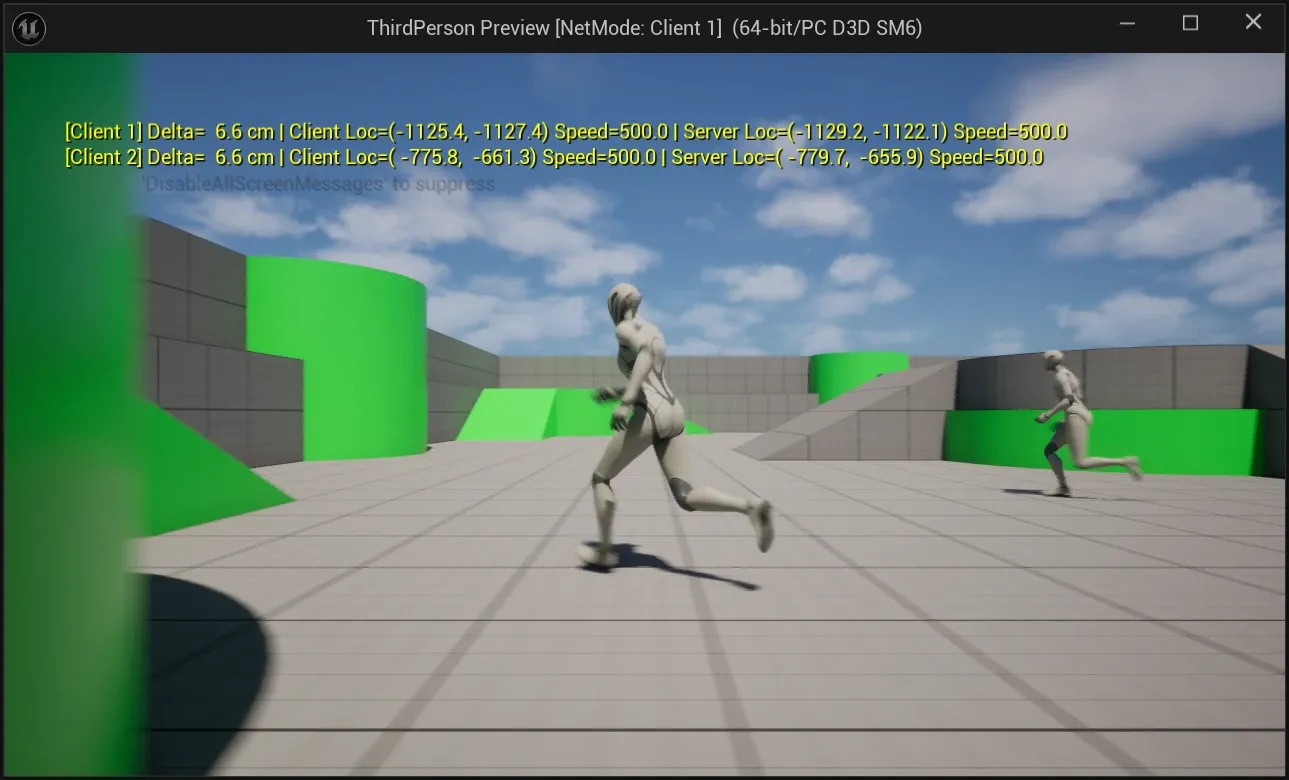
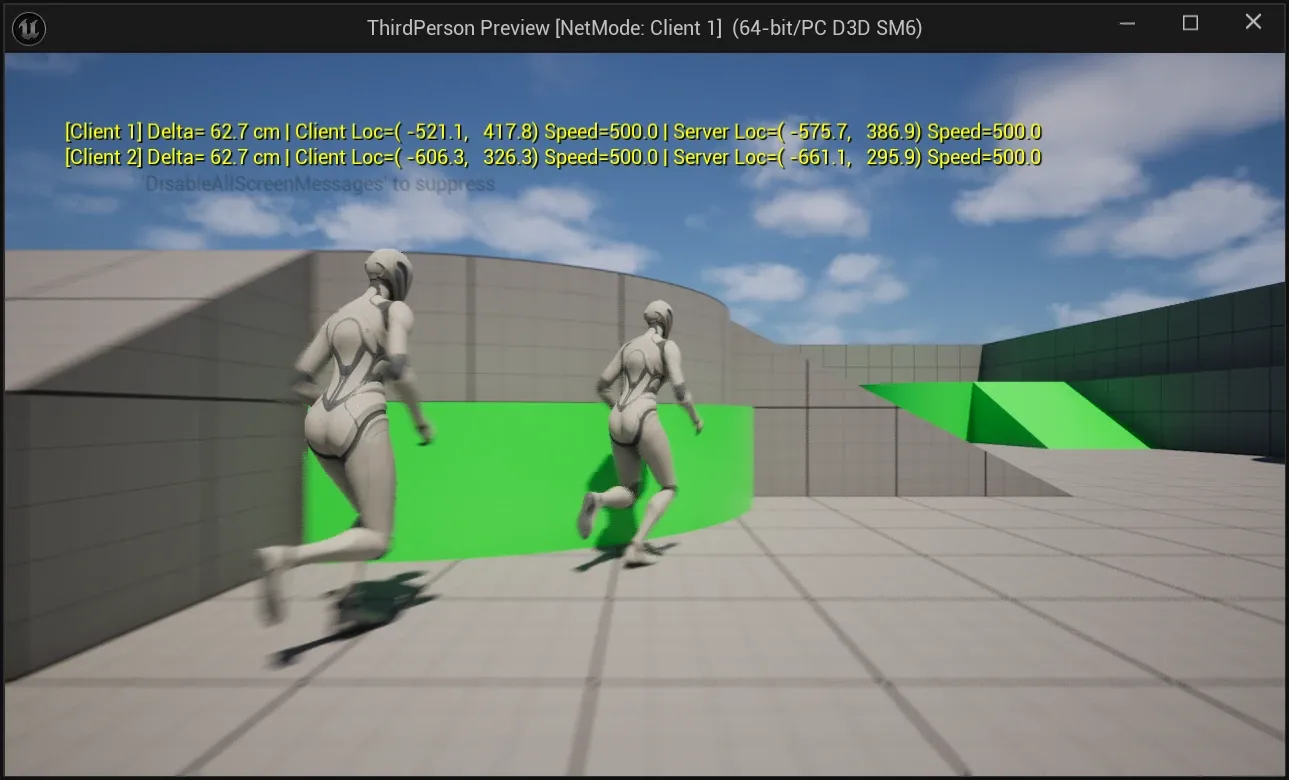
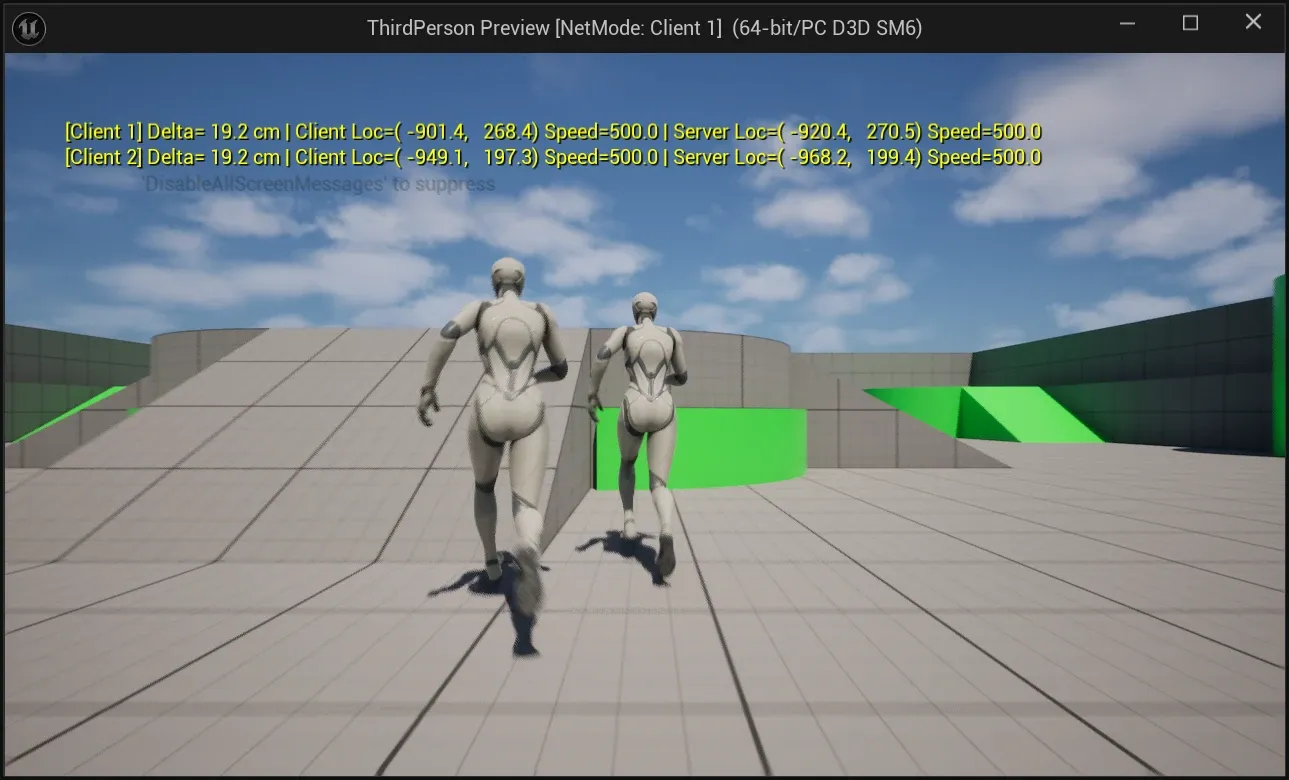
클라이언트 송신 지연을 100ms 늘릴 때마다 평균 차이가 약 50cm씩 늘었다. 500cm/s × 0.1s = 50cm이므로 이동 속도와 지연을 곱한 값과 맞는다.
CharacterMovement는 클라이언트가 먼저 이동하고 서버는 클라이언트가 보낸 이동을 받은 뒤에 같은 이동을 재현한다. 그래서 서버 측 위치는 클라이언트→서버 지연만큼 뒤처진다. 같은 100ms를 서버 송신 쪽에 주었을 때는 기준선과 거의 같았다. 서버→클라이언트 지연은 서버 측 사본이 갱신되는 시점과 관계가 없기 때문으로 보인다.
에뮬레이션이 없을 때 남는 10cm 안팎은 측정 당시 약 80fps에서 500cm/s로 1~2프레임 이동한 거리로 보인다.
에디터가 백그라운드에 있으면 Editor Preferences > General > Performance > Use Less CPU when in Background 때문에 PIE가 초당 몇 프레임으로 떨어진다. 이 상태에서는 프레임 시간이 차이에 그대로 섞인다. 처음 측정할 때 에뮬레이션 없이도 62cm가 나와서 이 설정을 끄고 다시 측정했다.
제약
- 모든 코드는
#if WITH_EDITOR안에 있다. 에디터가 아닌 게임 타깃(ThirdPerson Win64 Development)도 빌드해서 컴파일되는 것을 확인했고 이 빌드에서는 함수가nullptr을 반환하거나 아무것도 하지 않는다. - 서버와 클라이언트 월드가 같은 프로세스에 있을 때만 동작한다.
Run Under One Process를 끄거나Launch Separate Server를 켜면 이 전제가 깨진다. - 클라이언트 코드가 리플리케이션을 거치지 않고 서버 객체를 읽는 방식이다. 값을 읽어 비교하는 용도로만 쓰고 서버 객체의 상태를 바꾸는 데 쓰지 않는다.
글 공유하기
이 글이 도움이 되셨다면 다른 사람과 공유해 주세요!